

What is an IP phone?

In this article, you'll learn what IP phones are, how they work, and what benefits and features they offer. We'll also explain how you can determine which IP phone is right for you or your business.
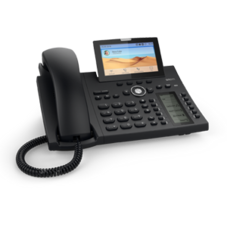
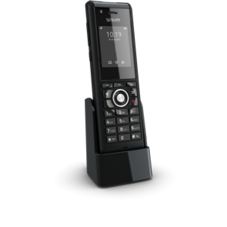
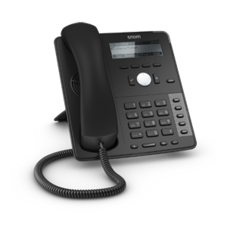
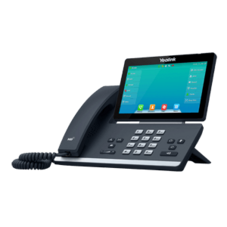
What is an IP phone?
An IP phone is a phone that can connect directly to the Internet and transmits calls using Voice over IP (VoIP) technology. In practice, making calls with an IP phone—whether cordless or corded—is virtually no different from making calls with a traditional phone.
The main difference from traditional phones is that IP phones communicate directly with a phone system or a SIP provider—often cloud-based, such as the Easybell Cloud Phone System. Traditional telephone technologies like ISDN or analog lines are now considered completely obsolete and have largely been phased out.
Various IP Phones
IP phones have been around since the 1990s, but initially played only a very minor role in the end-user device market. The reason: When the transition to All-IP began in the 2000s, router manufacturers equipped their devices with ports for virtually all types of phones, whether analog, ISDN, DECT, or IP technology. This allowed users to simply continue using their existing devices, so the demand for modern IP phones was low. For a long time, corporate phone systems relied on proprietary system phones, which guaranteed manufacturers substantial revenue. It was only gradually that expensive expansion cards were released to make the phone systems compatible with IP phones. Furthermore, a major advantage of IP telephony—namely, high sound quality thanks to HD calling—did not come into play, since this requires both participants to have a VoIP connection and an HD-capable device. And for quite some time, this was only the case in isolated instances.
VoIP has since become the standard fortelephony, and all providers have switched their connections to Internet telephony. Local phone systems now support only IP-based phones, and cloud-based phone systems rely on VoIP telephony anyway. At the same time, more and more people are experiencing HD sound, for example during video conferences. As a result, many have a growing desire to enjoy high-quality audio even during phone calls. The conditions for getting the most out of an IP phone are therefore in place. And this, in turn, is driving demand for IP phones.
What is VoIP?
Voice over IP, or VoIP for short, has become the standard in telephony in recent years. With VoIP, phone calls are no longer transmitted over old, analog telephone lines, but are converted into data packets and sent over the Internet. VoIP has now established itself as the standard and is replacing traditional telephone networks. You can learn more about this in our article on the ISDN phase-out.
How does an IP phone work?
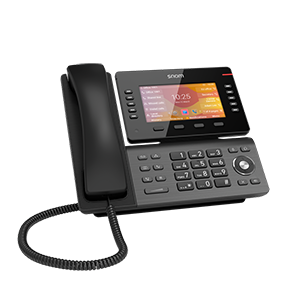
The basic user interface of an IP phone is no different from that of an analog phone: There are dial buttons, function keys, and so on. However, IP phones almost always offer a wider range of features, usually a larger display, and—depending on the model—other special features that set them apart from conventional models. Some phones can store pictures in the address book, display the weather, check e-mail, and much more. And, of course, IP phones can establish a VoIP connection over the Internet. To do so, they are simply connected via an Ethernet cable or Wi-Fi.
Establishing a connection with an IP phone takes just a few steps:
- First, the IP phone sends a call request with the “address” of the person being called to the SIP provider, whose server forwards the request to the destination.
- Once the connection is established, the server receives a confirmation message: the called party’s phone rings, and the caller hears the typical ringtone.
- When the called party answers, information is exchanged again, two voice streams (one in each direction) are established, and the connection is successfully established.
In most cases, you can configure the settings for the phone connection—and especially the basic setup of the device—directly via the phone’s web interface; however, many functions can of course also be conveniently set and operated on the device itself. Many models also support automatic setup of the phone by the phone system. In this case, you simply need to enter the phone’s MAC address and, if necessary, an additional security feature.
Features of Modern HD Telephony
HD Voice
HD, short for “High Definition,” means the same thing here as it does in the video and television fields: a higher resolution of the relevant information and, consequently, greater clarity of the image and sound. In VoIP telephony, the sound waves are encoded particularly efficiently right in the IP phone using the G.722 audio codec, ensuring that as few audio details as possible are lost. If a cordless phone is used, the converted digital signals are transmitted to the Internet connection via the CAT-iq standard, short for “Cordless Advanced Technology – Internet quality.” This minimizes static background noise and interference, often eliminating them entirely.
It’s important to know that HD telephony only works if both parties are using HD-capable devices. Only then can the HD encoding be decoded via the codec and the HD signals converted back into high-quality sound. If the person on the other end of the line isn’t using an HD-quality phone, even the best IP phone will only be able to achieve average sound quality. Both devices therefore always “agree” on the best possible common denominator.
Multiple Phone Numbers & Simultaneous Calls
Most IP phones can be linked to multiple phone numbers or SIP accounts, allowing the device to be reached or used to make calls under multiple numbers. This means, for example, that you can receive both personal and business calls on a single phone. The display will show which number the call is coming in on, so you can adjust your greeting accordingly. IP phones can not only use different numbers but can also usually handle multiple calls at the same time. If multiple handsets are connected to a base station, they can be used simultaneously without blocking each other. In addition to Internetbandwidth (you need approximately 100 Kbit/s per call), limiting factors here include the number of voice channels provided by your phone service provider and the maximum number of SIP channels that a device can establish simultaneously. For example, a FRITZ!Box can handle three calls via DECT and eight calls via SIP simultaneously; however, you use two SIP channels when you register an IP phone with a FRITZ!Box and make calls through it.
Encryption
Unlike traditional telephone service, calls made using IP phones can be encrypted. Instead of the standard VoIP transmission protocols SIP (Session Initiation Protocol) and RTP (Real-Time Transport Protocol), their secure variants, SIPS and SRTP, are used to transmit data packets. These protocols support encryption and can encrypt voice signals as they travel between a provider and an IP phone or between two IP phones.
In IP-based telephony, a call can be encrypted at two security levels:
- The most secure option is what’s known as end-to-end encryption. This type of encryption is also used in messaging apps such as Threema or Signal. An important prerequisite is that both phones use the same SIP provider or even the same PBX system. The voice signals are encrypted directly in the sending IP phone and decrypted only in the recipient’s device; the encryption remains in place “from one end to the other”—that is, throughout the entire transmission path over the Internet. The phone provider or PBX system needs to be involved only to establish and terminate the call.
- If the participants have connections with different telephone providers, the data is protected only up to the network boundary of the respective provider. However, when data is exchanged between providers, the call is then decrypted. Legal requirements play a role here—and often the data must be decrypted because encryption isn’t possible in the destination network. This is the case, for example, with mobile networks.
You can find more information on encryption here.
Color Display & Video Calling
IP phones also take advantage of the capabilities offered by modern display technology. For example, there are IP phones with touchscreens featuring vibrant colors and dimensions reminiscent of a tablet, on which high-resolution images or video conferences can be displayed alongside text. This allows you to continue working normally on your computer during a video call while still keeping an eye on the person you’re talking to. Even smaller devices usually have built-in color displays with comparatively high resolution, making it easy to see call information clearly.
Ports & Connectivity
Many modern IP phones offer an increasing number of ways to connect to the device. For example, some models feature built-in Wi-Fi and Bluetooth, as well as ports for USB, Ethernet, and headphones. Some even have memorycard slots. This makes the phone much more versatile, since you can also connect headsets or other external devices.
Convenience Features
Standard features of IP phones include, for example, mute and call hold, call waiting, call switching, call forwarding, speed dial buttons, a phone book, and caller ID. High-end devices also offer features such as conference calls, programmable function keys, busy lamp field (BLF), VPN support, password protection, and much more. Learn more about phone features here.
Advantages and Disadvantages of IP Phones
The advantages of an IP phone include:
- better sound quality. The voice is digitized using the appropriate codec right in the phone, which reduces interference and improves call quality. Of course, you should also make sure the device has high-quality microphones and speakers optimized for HD calling.
- A wider range of features compared to traditional phones.
- Greater flexibility of IP-enabled devices: In theory, you can take an IP phone with you anywhere—as long as there’s an internet connection, you can plug in the phone and make calls just as if you were at home or in the office.
- IP phones are generally very easy to set up and manage, since configuration is usually done via a web-based interface rather than through the phone’s buttons.
- Last but not least, the cost savings you can achieve by using VoIP technology are a strong argument in favor of IP telephony.
The disadvantages of an IP phone:
- An IP phone requires a constant power supply and a working internet connection. If either of these fails, phone calls are not possible. However, this limitation is nothing unusual these days: All internet-based services, such as audio and video streaming, rely on a stable internet connection to function properly—IP phones are no exception.
- If the internet connection is “just” very slow, this can lead to reduced sound quality on IP phones.
Which IP phone is right for me?
There is a wide variety of models and designs on the IP phone market: ranging from a basic push-button phone with minimal features—indistinguishable from an “old” model—to a luxurious desk phone with a large display, function keys, and a host of specialized features. There are plenty of excellent phones; here you’ll find a list of the most popular models that are certified for Easybell and allow for automatic configuration via the cloud-based phone system. By the way, this list is by no means exhaustive—you can use virtually any IP phone with an Easybell connection.
To find out which phone is right for you or your business, you should ask yourself the following questions:
Is the IP phone compatible with my phone system?
Because they use the widely adopted SIP standard, most devices work with all common phone systems and can be easily integrated. Nevertheless, you should check in advance to see if there are any compatibility issues.
What features do I need?
You know your needs and your communication processes best. Which features are just gimmicks, and which ones do you need for a smooth workflow? For example, consider how large your phone book needs to be, whether you need call forwarding, and so on. You should also factor video calling into your considerations and, if necessary, choose devices with the appropriate features.
How many SIP accounts do I want to set up?
If you want your device to be able to use multiple SIP accounts at the same time and handle concurrent calls, you'll need to check the device specifications for this feature.
How important is safety to me?
Encryption and data protection are an important part of business processes—not just for large corporations. Read our articles on security to learn more.
What other devices would I like to use?
If you have specific headsets or other devices that you want to connect to your phone, you should keep this in mind.
Wireless or Wired?
Especially in the office, a corded headset can prevent handsets from being accidentally swapped or misplaced. In addition, corded models are often less expensive.
And what about my old phone?
If you’re attached to your old device and can do without the features and sound quality of a modern IP phone, it’s also possible to use an analog or ISDN phone via a VoIP connection. The simplest solution is to use a VoIP-enabled router, such as a FRITZ!Box. These routers typically have a TAE jack to which you can connect your device.
If you don’t have a compatible router, you can also use an adapter—either an ISDN adapter (“ISDN Terminal Adapter,” or ITA for short) for ISDN phones or a phone adapter (VoIP ATA, short for “Analog Terminal Adapter”) for analog phones. These adapters act as a link between the phone and the modem, enabling Internet telephony for virtually any older device.
If you have any further questions about IP phones or need help setting them up, feel free to check out our Help Center or contact our knowledgeable support team directly!